
The Skylight Calendar Is the Hero of My Kids’ Nighttime Routine (It’s Everything I Ever Wanted!)
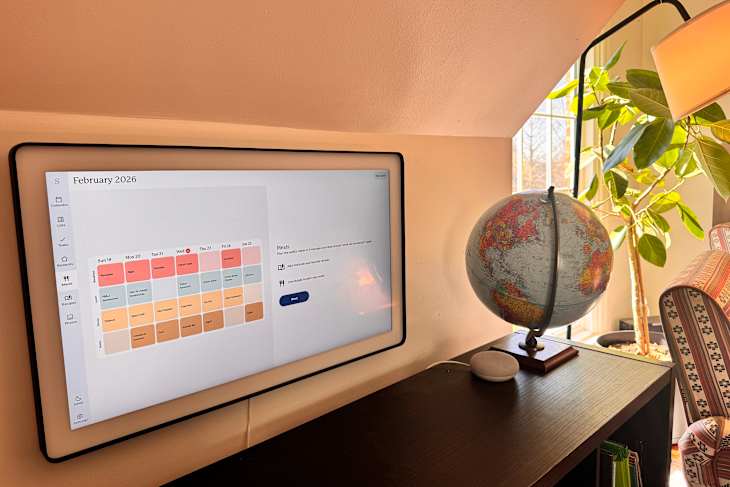
As a busy mom in a household of seven, I need alllll the help I can get when it comes to managing our schedules. My Google calendar does an excellent job of keeping our entire family’s calendar, but for years I struggled for a way to communicate to the family as a whole what we had going on on any given day and during the week.
I wanted the kids to know what was coming up that day, from doctors’ appointments to siblings’ sports games. And I also really, really wanted a place to record our plans for dinner because fielding the, “Mom, what’s for dinner?” question from multiple children a day was … not a good use of my patience.
For a while, I wrote out our weekly schedule (including each night’s dinner plan) on a white erase board in the kitchen. This worked fine, but it wasn’t dynamic; any changes in our schedule didn’t necessarily get updated on the whiteboard. Plus, it took me a while to write everything out each week, time that could have been devoted to prepping meals, laundry, resting, or any number of other things that could make the upcoming week successful.
I had a brief stint of imagining how I could use an iPad for the family, always on display in the kitchen to showcase our calendar and somehow show our weekly menu as well. But I didn’t like how the iPad being out meant free access to another screen. I would also need to use it for other things, so it didn’t end up being a kitchen fixture.
Then I was sent a Skylight Calendar (and more recently, a Skylight Calendar Max) and all my dreams came true. It did exactly what I wanted it to and then some.

What Is the Skylight Calendar?
The Skylight Calendar is a WiFi-connected smart calendar display that syncs to your Google calendar and displays it for the whole family to see. We keep ours in a central location, right in the kitchen. There’s also a menu screen where you can easily input nightly dinners so the kids can look that up whenever they want. And, as if that’s not already enough, the Skylight also has a system to assign and keep track of chores and assign rewards for finished chores!
It’s truly everything I ever wished for in a smart calendar system for the family, and it works so well.
What I Love About the Skylight Calendar
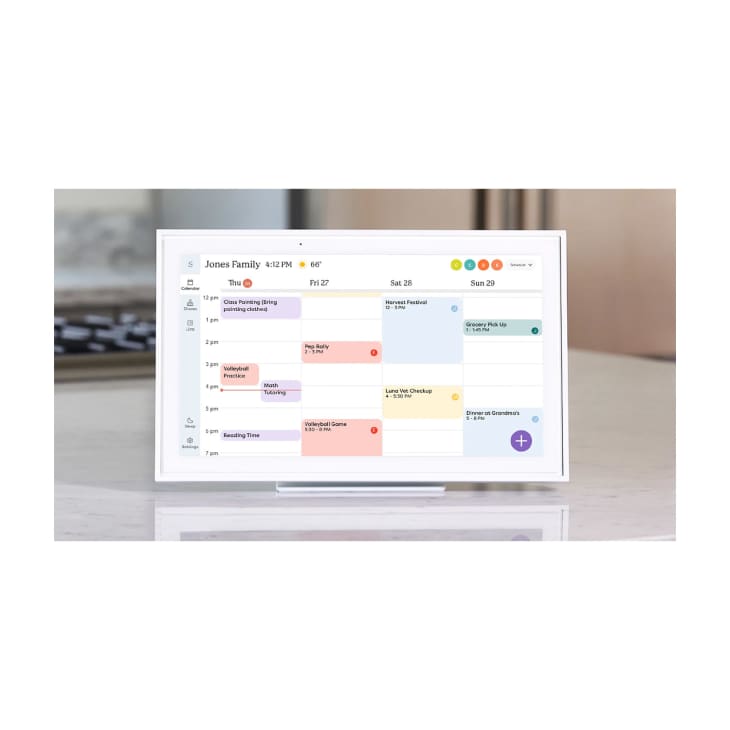
The Skylight Calendar, as its name suggests, is at its core a calendar, but it’s also so much more. It’s an all-in-one hub that keeps our family connected and informed. (Note that some features are only available with a subscription to the Plus plan.)
It’s easy to access and has seamless integration.
Any family member can go to the Skylight and see at a glance what is happening on any given day, week, or the entire month. You can also filter the view so you can see only your own calendar. Setup was super easy, and the calendar syncs perfectly with all of our Google calendars. (You can also enable two-way sync.) I can control the display and calendar from the app on my phone, and my older kids with phones can also use the app to check the calendar or their chores, etc.
The Sidekick feature allows you to import events to the calendar from emails, photos, and more; plan meals based on dietary needs; import recipes; and import lists. It’s a family’s dream AI assistant with real-world, practical help, and it works so well. The other day I took a photo of my computer screen, which was displaying a chart of upcoming sixth grade activities. I uploaded it into the Skylight Calendar, and it populated my child’s calendar perfectly. My mind was blown.
It clearly displays chores, lists, and routines.
Another reason I’m in love with the Skylight Calendar is the chore chart. I can assign chores for each child along with how many stars they get for each completed task. A reward screen allows everyone to see their progress toward rewards. (We give our older kids their allowance, or a portion of it, based on what they complete, and our younger kids work toward a prize.)
It also has a routines feature, which separates out steps of daily routines from the list of tasks. You can fill out items for morning, afternoon, and evening routines. For instance, I include entries for making the bed, brushing teeth, and brushing hair in the morning routine for my younger children. You can choose to give stars for routine items, or just use them as a checklist of reminders of what needs to get done.
I use the lists feature on our Skylight calendar to make packing lists for the kids that they can check off themselves. This is a game-changer for my younger kids who don’t have phones but who are capable of packing independently. It allows me to think through what my kids need, get it down “on paper,” and still give them the independence of taking care of themselves by using the calendar.
The lists feature became especially useful when the team at Skylight sent me a second calendar in the max size. At first, I thought it was excessive to have two Skylight calendars, one for upstairs and one for downstairs, but it’s been very useful. Not only can the kids use the upstairs Skylight to check their packing lists, but they can check off tasks and routine items they do upstairs, like brushing their teeth, making their beds, and getting ready for bed — it’s been a game-changer.
It streamlines meal-planning.
A meal calendar shows what’s on the menu for the week, but you can also use it to meal-plan and populate grocery lists. The lists feature not only saves your grocery list, but allows you to make any kind of list you need for the whole family to access.
It doubles as a photo frame.
Last but not least, the calendar can be used as a digital photo frame; you can upload photos for a revolving slideshow, or you can set it to display one photo or graphic. The possibilities are endless. I usually choose to display a seasonal picture or a family photo.

My Favorite Feature of the Skylight Calendar
While the features and design of the Skylight Calendar are stellar, it’s not even my favorite thing about it. The thing I appreciate the most is that the team behind the Skylight Calendar is constantly seeking feedback from the families who use their product — and incorporating the feedback in the many and frequent updates they push to the units. I know this from a Facebook group I’m in that’s run by the Skylight Calendar team. The team behind the Skylight Calendar are transparent about what they’re working on, constantly sharing updates on what’s in the works and coming up in the future.
Is the Skylight Calendar Worth It?
The Skylight Calendar is definitely an investment. The Skylight Calendar with a Plus subscription costs $149.99 for the 10” Calendar, $299.99 for the 15” Calendar, and $599.99 for the 27” Calendar Max. The Plus monthly subscription that unlocks the photo screensaver, meal planner, and Magic Import options (i.e., forward a PDF calendar from your kid’s school and it automatically imports all the dates!) in included for one month and then costs $79 per year.
I’ve found it to be worth it. On top of making such a substantial difference in the way our family stays connected and in the know, having the assurance that the company behind the Skylight Calendar is in the business of continuing to make the Skylight Calendar exactly what busy families need to make their lives easier makes it easily one of the best family products we own.
Buy: The Skylight Calendar, $149.99 – $599.99
The author was sent this product for free, but her reviews and opinions are her own.